

How session management works
Whenever a magic link, one-time passcode, or OAuth token is authenticated, MoonKey’s verify endpoints (VerifyOTP, and VerifyOAuthToken) can issue a session token if asession_expires_in parameter is provided.
The session_expires_in parameter sets the duration of the session in minutes from the current time. This session will be associated with:
- The authentication method used
- The user who successfully authenticated
- Device and browser information
Creating a session
During authentication
All verify endpoints support thesession_expires_in parameter to create or extend a session:
Session duration constraints
- Minimum duration: 5 minutes
- Maximum duration: 366 days (527,040 minutes)
- Default duration: 7 days (10,080 minutes)
Verifying sessions
Basic verification
Verify a session token to check if it’s still valid and retrieve the associated user:Successful response
Error response
When a session is invalid or expired:When a session is invalid, immediately delete the token from the client-side and return an unauthorized response to the user.
Extending sessions
You can extend an existing session’s duration using thesession_expires_in parameter:
Common extension patterns
Listing active sessions
View all active sessions for a specific user using the ListSessions endpoint:Response
Use case: Session management UI
Display a list of active sessions to users so they can manage their devices: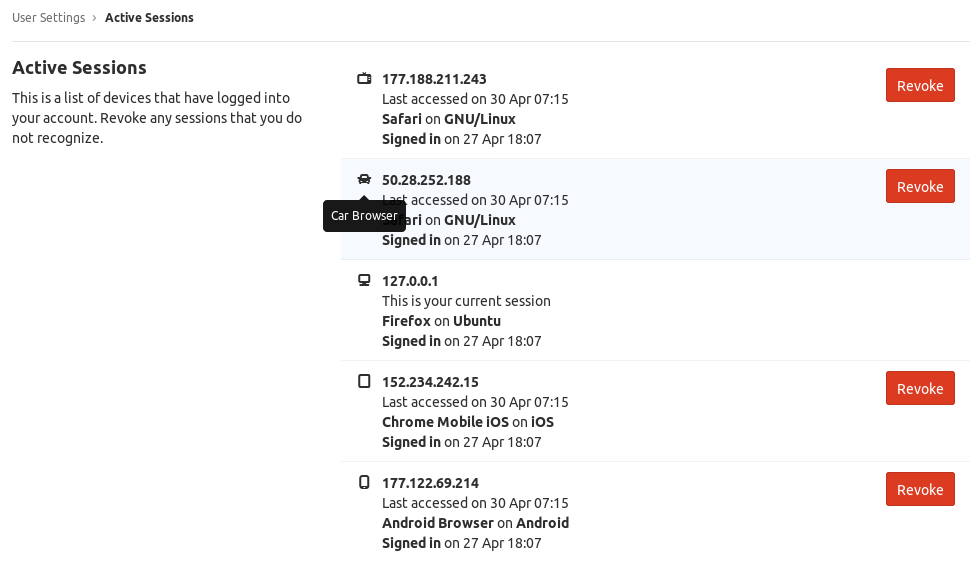
- View all devices where they’re logged in
- See when each session was created
- Revoke sessions from unfamiliar devices
Deleting sessions
Sign out of a session
Delete a specific session using the DeleteSession endpoint:Delete by session ID
You can also delete a session by its ID (useful for revoking other devices):Implementation patterns
Backend middleware
Implement session verification as middleware in your backend:Client-side session handling
When using manual REST API implementation (not the SDK):Security best practices
Backend verification
- Always verify on the backend - Never trust client-side session validation
- Use middleware - Centralize session verification logic
- Check on every request - Verify sessions for all protected endpoints
- Handle errors gracefully - Clear invalid sessions and redirect to login
Session storage
- Use IndexedDB - More secure than localStorage for session storage
- Secure cookies as alternative - Use
httpOnly,secure, andsameSiteflags - Never expose in logs - Don’t log session tokens or JWTs
- Clear on logout - Always delete session data from client storage
Session lifecycle
- Implement proper logout - Always call the delete session endpoint
- Allow session revocation - Let users manage and revoke active sessions
- Rotate after sensitive actions - Create new sessions after password changes
- Monitor suspicious activity - Track unusual session patterns
Common use cases
”Remember me” functionality
Implement different session durations based on user preference:Automatic session extension
Extend sessions on user activity:Troubleshooting
Session not found
Cause: Session was deleted, expired, or never existed Solution:- Check if the session token is correct
- Verify the session hasn’t expired
- Ensure the session wasn’t manually deleted
- Clear client-side storage and redirect to login
Unauthorized errors
Cause: API key is missing or incorrect Solution:- Verify your API key is correct
- Ensure you’re using
Bearertoken format - Check that the API key hasn’t been revoked
- Confirm you’re using the secret key (not public key)
Session expired too quickly
Cause: Session duration is too short Solution:- Increase
session_expires_inwhen creating sessions - Implement automatic session extension on user activity
- Configure longer default duration in dashboard