> ## Documentation Index
> Fetch the complete documentation index at: https://docs.streambird.io/llms.txt
> Use this file to discover all available pages before exploring further.
# Implement SMS OTP Authentication Flow
You can easily implement a phone number based login and authentication flow with MoonKey OTP API. Alternatively, you can also use our one-time passcode API to complement your existing authentication flow as a multi-factor authentication as shown **here**.
This example assumes that you are using the MoonKey Auth API in your backend using your MoonKey `ApiKey` that has access to your entire `App` on MoonKey.
## 1 - Implement OTP UI
Implement two UI screens to enable OTP
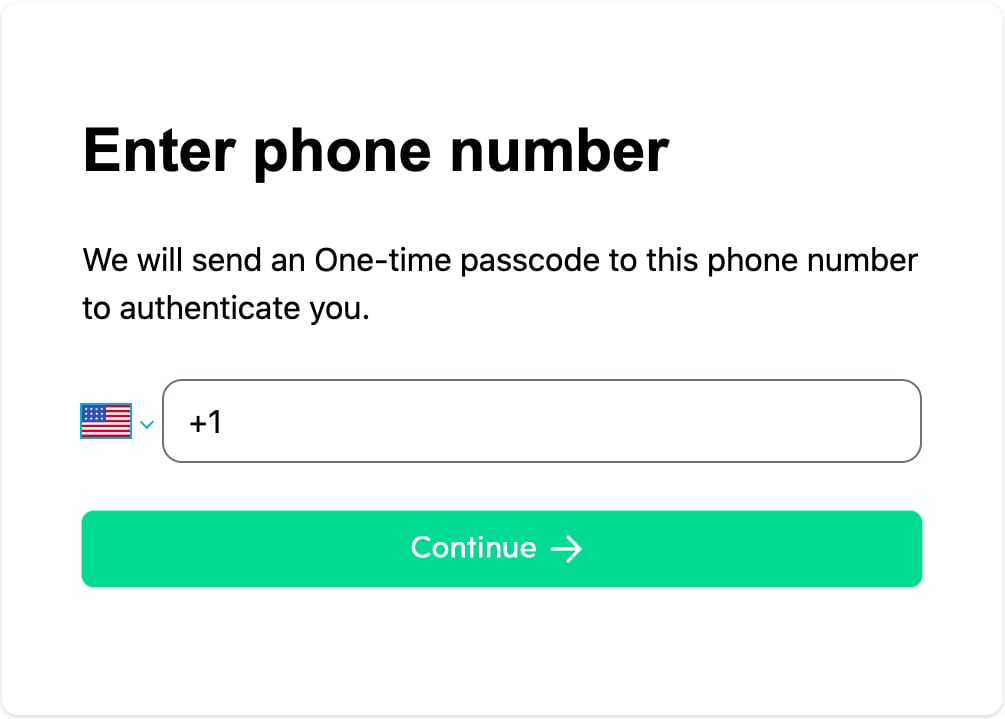
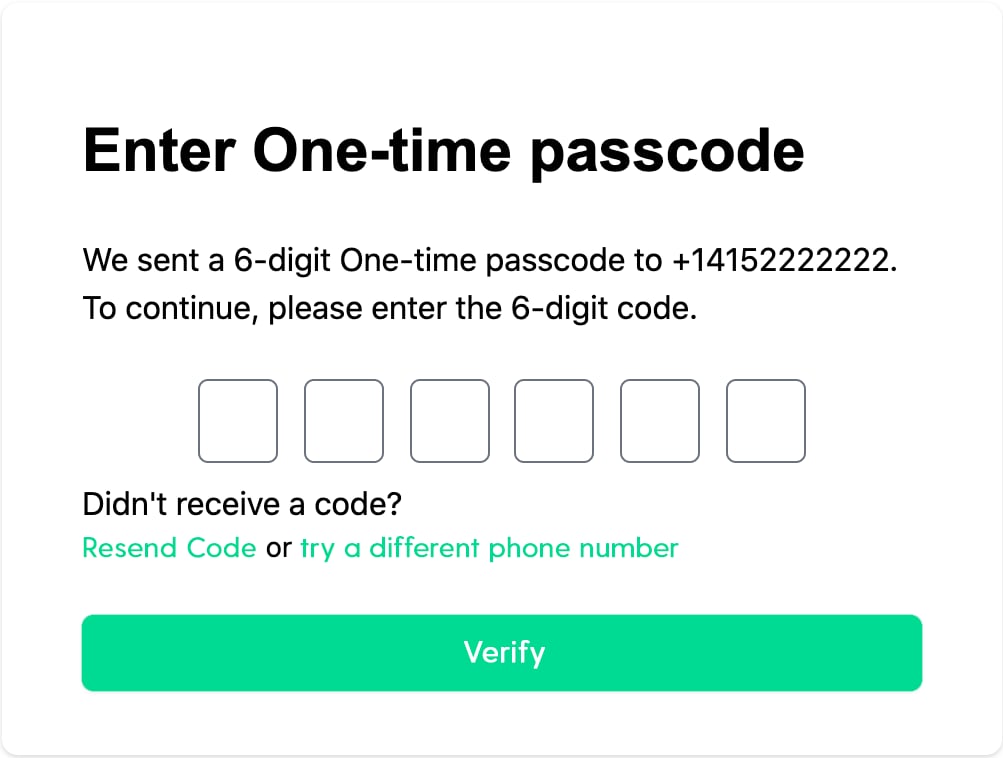 ## 2 - Register or Create user
Each user must be stored on MoonKey Auth, so we recommend ensuring that you store our auto generated User ID from the response into your database/backend in a column or field against that user (as long as you can associate your user with the auto generated ID returned by MoonKey).
We will ensure that each mobile number or email is ONLY attached to a single user at any time. We will be using the [**LoginOrCreateUserBySMS**](/api-reference/otps/login-or-create-user-by-sms), if a user is found with the provided phone number, it will be returned and OTP (one-time passcode) sent out, otherwise, a new user will be created on the fly (aka JIT, Just in time).
```bash cURL theme={null}
curl --location --request POST 'https://api.moonkey.fun/v1/auth/otps/sms/login_or_create' \
--header 'Authorization: Bearer sk_test_KJuRUZmh1XC342h1n39gH84MuSZDyD13NfhtDkaY6IfwpQA0H' \
--header 'Content-Type: application/json' \
--data-raw '{
"phone_number": "+14152222222"
}'
```
```ruby Ruby theme={null}
require 'streambird'
streambird = MoonKey.new(api_key: 'sk_test_KJuRUZmh1XC342h1n39gH84MuSZDyD13NfhtDkaY6IfwpQA0H')
resp = streambird.otps.sms.login_or_create(
phone_number: '+14152222222'
)
```
## 3 - Verify OTP
In the previous step, MoonKey Auth will return a response like the following,
```json JSON theme={null}
{
"phone_number_id": "pn_24oXBLRv6BoHXbNZoTAZkAFlRsy",
"user_active": true,
"user_id": "user_24wFP9pDa9YiMJLun94iKykoZs2"
}
```
The `phone_number_id` will be used as the `method_id` in the [**VerifyOTP**](/api-reference/otps/verify-otp-one-time-passcode) endpoint.
```bash cURL theme={null}
curl --location --request POST 'https://api.moonkey.fun/v1/auth/otps/verify' \
--header 'Authorization: Bearer sk_test_KJuRUZmh1XC342h1n39gH84MuSZDyD13NfhtDkaY6IfwpQA0H' \
--header 'Content-Type: application/json' \
--data-raw '{
"method_id": "pn_24oXBLRv6BoHXbNZoTAZkAFlRsy",
"otp": "982303"
}'
```
```ruby Ruby theme={null}
require 'streambird'
streambird = MoonKey.new(api_key: 'sk_test_KJuRUZmh1XC342h1n39gH84MuSZDyD13NfhtDkaY6IfwpQA0H')
resp = streambird.otps.verify(
method_id: 'pn_24oXBLRv6BoHXbNZoTAZkAFlRsy',
otp: '982303'
)
```
If you send in `session_token` or `session_expires_in` parameters, a new session will then be created or extended for the given user and the session token returned.
```json JSON theme={null}
{
"method_id": "pn_24oXBLRv6BoHXbNZoTAZkAFlRsy",
"method_type": "phone_number",
"session_token": "Fe8byh3HfbdopzNBu36hSMBDYDZGJAegwE9PvA3R0Ynqw1GBMpnABxuOveA0sAhU",
"user_id": "user_24wFP9pDa9YiMJLun94iKykoZs2"
}
```
You can then return your existing access token or session cookie to your user like you currently do in your application.
In the case where the user typed in invalid OTP, we will return
```json JSON theme={null}
{
"status_code": 400,
"error_message": "Invalid OTP Code.",
"error_type": "invalid_otp"
}
```
You can return or display this error to your user via your API or application.
Voila! You have now integrated 2-factor Authentication (2FA/MFA) and Signup into your application without building and maintaining additional infrastructures. Let us take care of Authentication and you can focus on your core product.
This `session_token` returned can also be used and stored with the user browser-side via cookie/localStorage if you want to use our Sessions API provided by MoonKey to manage sessions lifecyle for your User.
## 2 - Register or Create user
Each user must be stored on MoonKey Auth, so we recommend ensuring that you store our auto generated User ID from the response into your database/backend in a column or field against that user (as long as you can associate your user with the auto generated ID returned by MoonKey).
We will ensure that each mobile number or email is ONLY attached to a single user at any time. We will be using the [**LoginOrCreateUserBySMS**](/api-reference/otps/login-or-create-user-by-sms), if a user is found with the provided phone number, it will be returned and OTP (one-time passcode) sent out, otherwise, a new user will be created on the fly (aka JIT, Just in time).
```bash cURL theme={null}
curl --location --request POST 'https://api.moonkey.fun/v1/auth/otps/sms/login_or_create' \
--header 'Authorization: Bearer sk_test_KJuRUZmh1XC342h1n39gH84MuSZDyD13NfhtDkaY6IfwpQA0H' \
--header 'Content-Type: application/json' \
--data-raw '{
"phone_number": "+14152222222"
}'
```
```ruby Ruby theme={null}
require 'streambird'
streambird = MoonKey.new(api_key: 'sk_test_KJuRUZmh1XC342h1n39gH84MuSZDyD13NfhtDkaY6IfwpQA0H')
resp = streambird.otps.sms.login_or_create(
phone_number: '+14152222222'
)
```
## 3 - Verify OTP
In the previous step, MoonKey Auth will return a response like the following,
```json JSON theme={null}
{
"phone_number_id": "pn_24oXBLRv6BoHXbNZoTAZkAFlRsy",
"user_active": true,
"user_id": "user_24wFP9pDa9YiMJLun94iKykoZs2"
}
```
The `phone_number_id` will be used as the `method_id` in the [**VerifyOTP**](/api-reference/otps/verify-otp-one-time-passcode) endpoint.
```bash cURL theme={null}
curl --location --request POST 'https://api.moonkey.fun/v1/auth/otps/verify' \
--header 'Authorization: Bearer sk_test_KJuRUZmh1XC342h1n39gH84MuSZDyD13NfhtDkaY6IfwpQA0H' \
--header 'Content-Type: application/json' \
--data-raw '{
"method_id": "pn_24oXBLRv6BoHXbNZoTAZkAFlRsy",
"otp": "982303"
}'
```
```ruby Ruby theme={null}
require 'streambird'
streambird = MoonKey.new(api_key: 'sk_test_KJuRUZmh1XC342h1n39gH84MuSZDyD13NfhtDkaY6IfwpQA0H')
resp = streambird.otps.verify(
method_id: 'pn_24oXBLRv6BoHXbNZoTAZkAFlRsy',
otp: '982303'
)
```
If you send in `session_token` or `session_expires_in` parameters, a new session will then be created or extended for the given user and the session token returned.
```json JSON theme={null}
{
"method_id": "pn_24oXBLRv6BoHXbNZoTAZkAFlRsy",
"method_type": "phone_number",
"session_token": "Fe8byh3HfbdopzNBu36hSMBDYDZGJAegwE9PvA3R0Ynqw1GBMpnABxuOveA0sAhU",
"user_id": "user_24wFP9pDa9YiMJLun94iKykoZs2"
}
```
You can then return your existing access token or session cookie to your user like you currently do in your application.
In the case where the user typed in invalid OTP, we will return
```json JSON theme={null}
{
"status_code": 400,
"error_message": "Invalid OTP Code.",
"error_type": "invalid_otp"
}
```
You can return or display this error to your user via your API or application.
Voila! You have now integrated 2-factor Authentication (2FA/MFA) and Signup into your application without building and maintaining additional infrastructures. Let us take care of Authentication and you can focus on your core product.
This `session_token` returned can also be used and stored with the user browser-side via cookie/localStorage if you want to use our Sessions API provided by MoonKey to manage sessions lifecyle for your User.