> ## Documentation Index
> Fetch the complete documentation index at: https://docs.streambird.io/llms.txt
> Use this file to discover all available pages before exploring further.
# Session Management
> Implement advanced session management with MoonKey's REST API
This guide covers implementing session management using MoonKey's REST API. Learn how to create, verify, extend, and delete user sessions in your backend application.
## How session management works
Whenever a magic link, one-time passcode, or OAuth token is authenticated, MoonKey's verify endpoints ([**VerifyOTP**](/api-reference/otps/verify-otp-one-time-passcode), and [**VerifyOAuthToken**](/api-reference/oauth/verify-token)) can issue a session token if a `session_expires_in` parameter is provided.
The `session_expires_in` parameter sets the duration of the session in minutes from the current time. This session will be associated with:
* The authentication method used
* The user who successfully authenticated
* Device and browser information
All session endpoints require your secret API key and should only be used on your backend/server-side. **NEVER expose your API key** in client-side code.
## Creating a session
### During authentication
All verify endpoints support the `session_expires_in` parameter to create or extend a session:
```bash cURL - Email OTP theme={null}
curl -X POST 'https://api.moonkey.fun/v1/auth/otps/verify' \
-H 'Authorization: Bearer sk_test_your_api_key' \
-H 'Content-Type: application/json' \
-d '{
"code": "123456",
"email": "user@example.com",
"session_expires_in": 10080
}'
```
```bash cURL - Magic Link theme={null}
curl -X POST 'https://api.moonkey.fun/v1/auth/magic_links/verify' \
-H 'Authorization: Bearer sk_test_your_api_key' \
-H 'Content-Type: application/json' \
-d '{
"token": "magic_link_token_here",
"session_expires_in": 10080
}'
```
```bash cURL - OAuth theme={null}
curl -X POST 'https://api.moonkey.fun/v1/auth/oauth/verify' \
-H 'Authorization: Bearer sk_test_your_api_key' \
-H 'Content-Type: application/json' \
-d '{
"code": "oauth_code_here",
"session_expires_in": 10080
}'
```
### Session duration constraints
* **Minimum duration:** 5 minutes
* **Maximum duration:** 366 days (527,040 minutes)
* **Default duration:** 7 days (10,080 minutes)
The response will include both a session token and session JWT:
```json theme={null}
{
"session_token": "vy9YGpubKjVn98cw1nT25Msj7jaIpHBinUfD45KLdAOgn9NqEuE4qGHOEchEG5Ue",
"session_jwt": "eyJhbGciOiJSUzI1NiIsInR5cCI6IkpXVCJ9...",
"user": {
"id": "user_abc123",
"email": "user@example.com",
// ... other user fields
},
"session": {
"id": "session_xyz789",
"user_id": "user_abc123",
"expires_at": 1704067200,
"created_at": 1703462400
}
}
```
Store the `session_token` or `session_jwt` on the client-side. The MoonKey SDK automatically handles this using IndexedDB.
## Verifying sessions
### Basic verification
Verify a session token to check if it's still valid and retrieve the associated user:
```bash cURL theme={null}
curl -X POST 'https://api.moonkey.fun/v1/auth/sessions/verify' \
-H 'Authorization: Bearer sk_test_your_api_key' \
-H 'Content-Type: application/json' \
-d '{
"session_token": "vy9YGpubKjVn98cw1nT25Msj7jaIpHBinUfD45KLdAOgn9NqEuE4qGHOEchEG5Ue"
}'
```
```javascript JavaScript theme={null}
const apiKey = process.env.MOONKEY_SECRET_KEY;
const sessionToken = request.headers.get('session-token');
const response = await fetch('https://api.moonkey.fun/v1/auth/sessions/verify', {
method: 'POST',
headers: {
'Authorization': `Bearer ${apiKey}`,
'Content-Type': 'application/json'
},
body: JSON.stringify({
session_token: sessionToken
})
});
if (!response.ok) {
// Session is invalid or expired
return { error: 'Unauthorized' };
}
const { session, user } = await response.json();
// User is authenticated, proceed with request
```
```python Python theme={null}
import requests
import os
api_key = os.environ.get('MOONKEY_SECRET_KEY')
session_token = request.headers.get('session-token')
response = requests.post(
'https://api.moonkey.fun/v1/auth/sessions/verify',
headers={
'Authorization': f'Bearer {api_key}',
'Content-Type': 'application/json'
},
json={'session_token': session_token}
)
if response.status_code != 200:
# Session is invalid or expired
return {'error': 'Unauthorized'}, 401
data = response.json()
session = data['session']
user = data['user']
# User is authenticated, proceed with request
```
### Successful response
```json theme={null}
{
"session": {
"id": "session_xyz789",
"user_id": "user_abc123",
"expires_at": 1704067200,
"created_at": 1703462400,
"device_info": {
"user_agent": "Mozilla/5.0...",
"ip_address": "192.168.1.1"
}
},
"user": {
"id": "user_abc123",
"email": "user@example.com",
// ... other user fields
}
}
```
### Error response
When a session is invalid or expired:
```json theme={null}
{
"error": {
"code": "invalid_session",
"message": "Session not found or has expired"
}
}
```
When a session is invalid, immediately delete the token from the client-side and return an unauthorized response to the user.
## Extending sessions
You can extend an existing session's duration using the `session_expires_in` parameter:
```bash cURL theme={null}
curl -X POST 'https://api.moonkey.fun/v1/auth/sessions/verify' \
-H 'Authorization: Bearer sk_test_your_api_key' \
-H 'Content-Type: application/json' \
-d '{
"session_token": "vy9YGpubKjVn98cw1nT25Msj7jaIpHBinUfD45KLdAOgn9NqEuE4qGHOEchEG5Ue",
"session_expires_in": 10080
}'
```
```javascript JavaScript theme={null}
// Extend session by 7 days (10,080 minutes)
const response = await fetch('https://api.moonkey.fun/v1/auth/sessions/verify', {
method: 'POST',
headers: {
'Authorization': `Bearer ${apiKey}`,
'Content-Type': 'application/json'
},
body: JSON.stringify({
session_token: sessionToken,
session_expires_in: 10080 // 7 days
})
});
```
The extended session will now expire N minutes from the current time.
### Common extension patterns
| Use Case | Duration (minutes) | Duration (days) |
| ---------------- | ------------------ | --------------- |
| Short session | 1,440 | 1 day |
| Standard session | 10,080 | 7 days |
| Remember me | 43,200 | 30 days |
| Maximum duration | 527,040 | 366 days |
## Listing active sessions
View all active sessions for a specific user using the [**ListSessions**](/api-reference/sessions/list-sessions) endpoint:
```bash cURL theme={null}
curl -X GET 'https://api.moonkey.fun/v1/auth/sessions/list?user_id=user_abc123' \
-H 'Authorization: Bearer sk_test_your_api_key'
```
```javascript JavaScript theme={null}
const response = await fetch(
`https://api.moonkey.fun/v1/auth/sessions/list?user_id=${userId}`,
{
headers: {
'Authorization': `Bearer ${apiKey}`
}
}
);
const { sessions } = await response.json();
```
### Response
```json theme={null}
{
"sessions": [
{
"id": "session_xyz789",
"user_id": "user_abc123",
"expires_at": 1704067200,
"created_at": 1703462400,
"device_info": {
"user_agent": "Mozilla/5.0 (iPhone; CPU iPhone OS 16_0 like Mac OS X)...",
"ip_address": "192.168.1.1"
}
},
{
"id": "session_def456",
"user_id": "user_abc123",
"expires_at": 1704153600,
"created_at": 1703548800,
"device_info": {
"user_agent": "Mozilla/5.0 (Windows NT 10.0; Win64; x64)...",
"ip_address": "192.168.1.5"
}
}
]
}
```
### Use case: Session management UI
Display a list of active sessions to users so they can manage their devices:
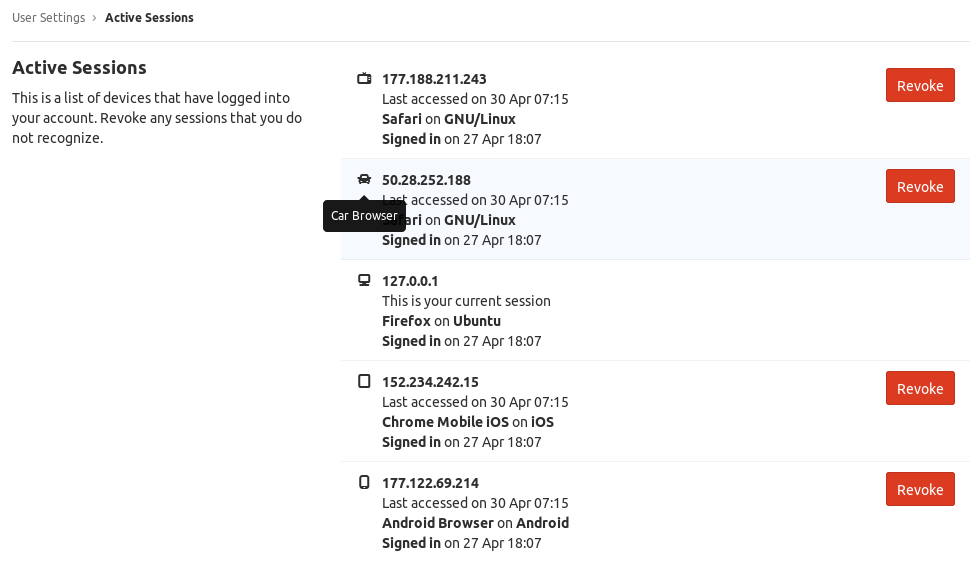 This allows users to:
* View all devices where they're logged in
* See when each session was created
* Revoke sessions from unfamiliar devices
## Deleting sessions
### Sign out of a session
Delete a specific session using the [**DeleteSession**](/api-reference/sessions/delete-session) endpoint:
```bash cURL theme={null}
curl -X DELETE 'https://api.moonkey.fun/v1/auth/sessions/delete' \
-H 'Authorization: Bearer sk_test_your_api_key' \
-H 'Content-Type: application/json' \
-d '{
"session_token": "vy9YGpubKjVn98cw1nT25Msj7jaIpHBinUfD45KLdAOgn9NqEuE4qGHOEchEG5Ue"
}'
```
```javascript JavaScript theme={null}
// User clicks "Logout"
const response = await fetch('https://api.moonkey.fun/v1/auth/sessions/delete', {
method: 'DELETE',
headers: {
'Authorization': `Bearer ${apiKey}`,
'Content-Type': 'application/json'
},
body: JSON.stringify({
session_token: sessionToken
})
});
if (response.ok) {
// Clear session from client-side storage
// Redirect to login page
}
```
```python Python theme={null}
response = requests.delete(
'https://api.moonkey.fun/v1/auth/sessions/delete',
headers={
'Authorization': f'Bearer {api_key}',
'Content-Type': 'application/json'
},
json={'session_token': session_token}
)
if response.status_code == 200:
# Clear session from client
# Redirect to login
pass
```
### Delete by session ID
You can also delete a session by its ID (useful for revoking other devices):
```bash theme={null}
curl -X DELETE 'https://api.moonkey.fun/v1/auth/sessions/delete' \
-H 'Authorization: Bearer sk_test_your_api_key' \
-H 'Content-Type: application/json' \
-d '{
"session_id": "session_xyz789"
}'
```
## Implementation patterns
### Backend middleware
Implement session verification as middleware in your backend:
```javascript Express.js theme={null}
// middleware/auth.js
async function requireAuth(req, res, next) {
const sessionToken = req.headers['session-token'];
if (!sessionToken) {
return res.status(401).json({ error: 'No session token provided' });
}
try {
const response = await fetch('https://api.moonkey.fun/v1/auth/sessions/verify', {
method: 'POST',
headers: {
'Authorization': `Bearer ${process.env.MOONKEY_SECRET_KEY}`,
'Content-Type': 'application/json'
},
body: JSON.stringify({ session_token: sessionToken })
});
if (!response.ok) {
return res.status(401).json({ error: 'Invalid session' });
}
const { session, user } = await response.json();
// Attach user to request
req.user = user;
req.session = session;
next();
} catch (error) {
return res.status(500).json({ error: 'Session verification failed' });
}
}
// Use in routes
app.get('/api/profile', requireAuth, (req, res) => {
res.json({ user: req.user });
});
```
```python Flask theme={null}
from functools import wraps
from flask import request, jsonify
import requests
import os
def require_auth(f):
@wraps(f)
def decorated_function(*args, **kwargs):
session_token = request.headers.get('session-token')
if not session_token:
return jsonify({'error': 'No session token provided'}), 401
try:
response = requests.post(
'https://api.moonkey.fun/v1/auth/sessions/verify',
headers={
'Authorization': f'Bearer {os.environ.get("MOONKEY_SECRET_KEY")}',
'Content-Type': 'application/json'
},
json={'session_token': session_token}
)
if response.status_code != 200:
return jsonify({'error': 'Invalid session'}), 401
data = response.json()
request.user = data['user']
request.session = data['session']
return f(*args, **kwargs)
except Exception as e:
return jsonify({'error': 'Session verification failed'}), 500
return decorated_function
# Use in routes
@app.route('/api/profile')
@require_auth
def profile():
return jsonify({'user': request.user})
```
### Client-side session handling
When using manual REST API implementation (not the SDK):
```javascript theme={null}
// Store session after login
async function login(email, code) {
const response = await fetch('/api/auth/verify-otp', {
method: 'POST',
body: JSON.stringify({ email, code })
});
const { session_token, session_jwt, user } = await response.json();
// Store in IndexedDB or secure storage
await storeSession({ session_token, session_jwt, user });
}
// Include session in requests
async function makeAuthenticatedRequest(url, options = {}) {
const session = await getSession();
return fetch(url, {
...options,
headers: {
...options.headers,
'session-token': session.session_token
}
});
}
// Handle session expiration
async function handleResponse(response) {
if (response.status === 401) {
// Session expired or invalid
await clearSession();
redirectToLogin();
}
return response;
}
```
## Security best practices
### Backend verification
* **Always verify on the backend** - Never trust client-side session validation
* **Use middleware** - Centralize session verification logic
* **Check on every request** - Verify sessions for all protected endpoints
* **Handle errors gracefully** - Clear invalid sessions and redirect to login
### Session storage
* **Use IndexedDB** - More secure than localStorage for session storage
* **Secure cookies as alternative** - Use `httpOnly`, `secure`, and `sameSite` flags
* **Never expose in logs** - Don't log session tokens or JWTs
* **Clear on logout** - Always delete session data from client storage
### Session lifecycle
* **Implement proper logout** - Always call the delete session endpoint
* **Allow session revocation** - Let users manage and revoke active sessions
* **Rotate after sensitive actions** - Create new sessions after password changes
* **Monitor suspicious activity** - Track unusual session patterns
## Common use cases
### "Remember me" functionality
Implement different session durations based on user preference:
```javascript theme={null}
async function login(email, code, rememberMe) {
const sessionExpiresIn = rememberMe
? 43200 // 30 days
: 1440; // 1 day
const response = await verifyOTP(email, code, sessionExpiresIn);
return response;
}
```
### Automatic session extension
Extend sessions on user activity:
```javascript theme={null}
// Extend session on each verified request
async function verifyAndExtendSession(sessionToken) {
return await fetch('https://api.moonkey.fun/v1/auth/sessions/verify', {
method: 'POST',
headers: {
'Authorization': `Bearer ${apiKey}`,
'Content-Type': 'application/json'
},
body: JSON.stringify({
session_token: sessionToken,
session_expires_in: 10080 // Reset to 7 days
})
});
}
```
## Troubleshooting
### Session not found
**Cause:** Session was deleted, expired, or never existed
**Solution:**
* Check if the session token is correct
* Verify the session hasn't expired
* Ensure the session wasn't manually deleted
* Clear client-side storage and redirect to login
### Unauthorized errors
**Cause:** API key is missing or incorrect
**Solution:**
* Verify your API key is correct
* Ensure you're using `Bearer` token format
* Check that the API key hasn't been revoked
* Confirm you're using the secret key (not public key)
### Session expired too quickly
**Cause:** Session duration is too short
**Solution:**
* Increase `session_expires_in` when creating sessions
* Implement automatic session extension on user activity
* Configure longer default duration in dashboard
This allows users to:
* View all devices where they're logged in
* See when each session was created
* Revoke sessions from unfamiliar devices
## Deleting sessions
### Sign out of a session
Delete a specific session using the [**DeleteSession**](/api-reference/sessions/delete-session) endpoint:
```bash cURL theme={null}
curl -X DELETE 'https://api.moonkey.fun/v1/auth/sessions/delete' \
-H 'Authorization: Bearer sk_test_your_api_key' \
-H 'Content-Type: application/json' \
-d '{
"session_token": "vy9YGpubKjVn98cw1nT25Msj7jaIpHBinUfD45KLdAOgn9NqEuE4qGHOEchEG5Ue"
}'
```
```javascript JavaScript theme={null}
// User clicks "Logout"
const response = await fetch('https://api.moonkey.fun/v1/auth/sessions/delete', {
method: 'DELETE',
headers: {
'Authorization': `Bearer ${apiKey}`,
'Content-Type': 'application/json'
},
body: JSON.stringify({
session_token: sessionToken
})
});
if (response.ok) {
// Clear session from client-side storage
// Redirect to login page
}
```
```python Python theme={null}
response = requests.delete(
'https://api.moonkey.fun/v1/auth/sessions/delete',
headers={
'Authorization': f'Bearer {api_key}',
'Content-Type': 'application/json'
},
json={'session_token': session_token}
)
if response.status_code == 200:
# Clear session from client
# Redirect to login
pass
```
### Delete by session ID
You can also delete a session by its ID (useful for revoking other devices):
```bash theme={null}
curl -X DELETE 'https://api.moonkey.fun/v1/auth/sessions/delete' \
-H 'Authorization: Bearer sk_test_your_api_key' \
-H 'Content-Type: application/json' \
-d '{
"session_id": "session_xyz789"
}'
```
## Implementation patterns
### Backend middleware
Implement session verification as middleware in your backend:
```javascript Express.js theme={null}
// middleware/auth.js
async function requireAuth(req, res, next) {
const sessionToken = req.headers['session-token'];
if (!sessionToken) {
return res.status(401).json({ error: 'No session token provided' });
}
try {
const response = await fetch('https://api.moonkey.fun/v1/auth/sessions/verify', {
method: 'POST',
headers: {
'Authorization': `Bearer ${process.env.MOONKEY_SECRET_KEY}`,
'Content-Type': 'application/json'
},
body: JSON.stringify({ session_token: sessionToken })
});
if (!response.ok) {
return res.status(401).json({ error: 'Invalid session' });
}
const { session, user } = await response.json();
// Attach user to request
req.user = user;
req.session = session;
next();
} catch (error) {
return res.status(500).json({ error: 'Session verification failed' });
}
}
// Use in routes
app.get('/api/profile', requireAuth, (req, res) => {
res.json({ user: req.user });
});
```
```python Flask theme={null}
from functools import wraps
from flask import request, jsonify
import requests
import os
def require_auth(f):
@wraps(f)
def decorated_function(*args, **kwargs):
session_token = request.headers.get('session-token')
if not session_token:
return jsonify({'error': 'No session token provided'}), 401
try:
response = requests.post(
'https://api.moonkey.fun/v1/auth/sessions/verify',
headers={
'Authorization': f'Bearer {os.environ.get("MOONKEY_SECRET_KEY")}',
'Content-Type': 'application/json'
},
json={'session_token': session_token}
)
if response.status_code != 200:
return jsonify({'error': 'Invalid session'}), 401
data = response.json()
request.user = data['user']
request.session = data['session']
return f(*args, **kwargs)
except Exception as e:
return jsonify({'error': 'Session verification failed'}), 500
return decorated_function
# Use in routes
@app.route('/api/profile')
@require_auth
def profile():
return jsonify({'user': request.user})
```
### Client-side session handling
When using manual REST API implementation (not the SDK):
```javascript theme={null}
// Store session after login
async function login(email, code) {
const response = await fetch('/api/auth/verify-otp', {
method: 'POST',
body: JSON.stringify({ email, code })
});
const { session_token, session_jwt, user } = await response.json();
// Store in IndexedDB or secure storage
await storeSession({ session_token, session_jwt, user });
}
// Include session in requests
async function makeAuthenticatedRequest(url, options = {}) {
const session = await getSession();
return fetch(url, {
...options,
headers: {
...options.headers,
'session-token': session.session_token
}
});
}
// Handle session expiration
async function handleResponse(response) {
if (response.status === 401) {
// Session expired or invalid
await clearSession();
redirectToLogin();
}
return response;
}
```
## Security best practices
### Backend verification
* **Always verify on the backend** - Never trust client-side session validation
* **Use middleware** - Centralize session verification logic
* **Check on every request** - Verify sessions for all protected endpoints
* **Handle errors gracefully** - Clear invalid sessions and redirect to login
### Session storage
* **Use IndexedDB** - More secure than localStorage for session storage
* **Secure cookies as alternative** - Use `httpOnly`, `secure`, and `sameSite` flags
* **Never expose in logs** - Don't log session tokens or JWTs
* **Clear on logout** - Always delete session data from client storage
### Session lifecycle
* **Implement proper logout** - Always call the delete session endpoint
* **Allow session revocation** - Let users manage and revoke active sessions
* **Rotate after sensitive actions** - Create new sessions after password changes
* **Monitor suspicious activity** - Track unusual session patterns
## Common use cases
### "Remember me" functionality
Implement different session durations based on user preference:
```javascript theme={null}
async function login(email, code, rememberMe) {
const sessionExpiresIn = rememberMe
? 43200 // 30 days
: 1440; // 1 day
const response = await verifyOTP(email, code, sessionExpiresIn);
return response;
}
```
### Automatic session extension
Extend sessions on user activity:
```javascript theme={null}
// Extend session on each verified request
async function verifyAndExtendSession(sessionToken) {
return await fetch('https://api.moonkey.fun/v1/auth/sessions/verify', {
method: 'POST',
headers: {
'Authorization': `Bearer ${apiKey}`,
'Content-Type': 'application/json'
},
body: JSON.stringify({
session_token: sessionToken,
session_expires_in: 10080 // Reset to 7 days
})
});
}
```
## Troubleshooting
### Session not found
**Cause:** Session was deleted, expired, or never existed
**Solution:**
* Check if the session token is correct
* Verify the session hasn't expired
* Ensure the session wasn't manually deleted
* Clear client-side storage and redirect to login
### Unauthorized errors
**Cause:** API key is missing or incorrect
**Solution:**
* Verify your API key is correct
* Ensure you're using `Bearer` token format
* Check that the API key hasn't been revoked
* Confirm you're using the secret key (not public key)
### Session expired too quickly
**Cause:** Session duration is too short
**Solution:**
* Increase `session_expires_in` when creating sessions
* Implement automatic session extension on user activity
* Configure longer default duration in dashboard